
As a business subscriber to Microsoft 365, you can enable your organization to experiment with the latest AI technologies through the Frontier program. Frontier provides pre-release access to new features such as Microsoft Scout.
Prerequisites
- Your IT administrator needs to enable Frontier for your organization.
- Your IT administrator needs to enable your user account to access Frontier.
- You must have an active Copilot license assigned to you.
Enable Frontier for your organization
The first step is to turn on the Copilot Frontier feature:
- Go to the admin portal at https://admin.cloud.microsoft.
- On the side menu, click Copilot > Settings.
- Click the View all tab.
- In the search box, search for Copilot Frontier.
- Click Copilot Frontier in the list.
- Decide whether to enable Frontier for all users or specific users (see next).
Roll out to All users or Specific users
When you enable Copilot Frontier for your organization, you need to decide whether to grant access to all users or specific users.
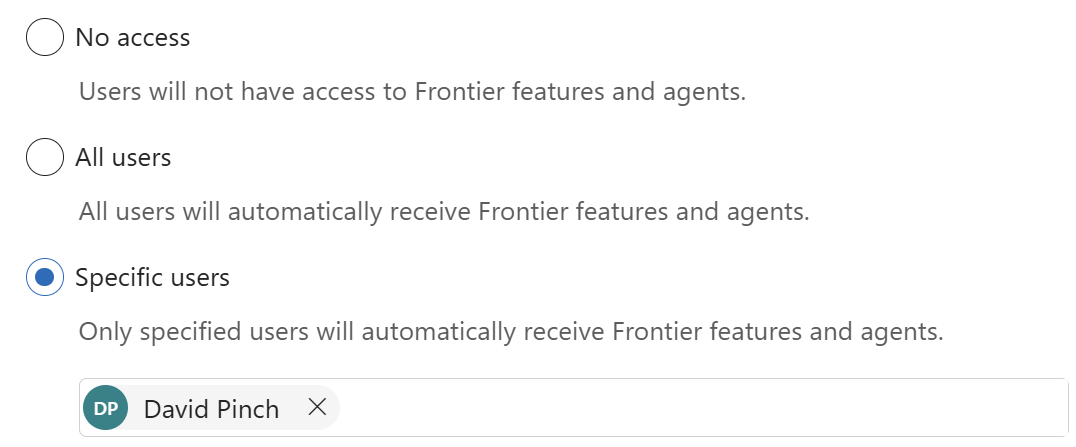
Reasons for selecting All users:
- Leadership wants fast adoption + cultural shift
- The organization is relatively small
- The organization is comfortable with pre-release features
Reasons for selecting Specific users:
- You want to start with early adopters and power users
- You want to internal champions to learn and train others
- You want to avoid confusing users or increasing support load
- You’re unsure about data exposure and file permissions hygiene
- Your organization has strict compliance and other requirements
A common rollout strategy for any new feature is to:
- Start with selected users in a pilot, e.g., IT + a business unit
- Fix any discovered issues such as permissions
- Expand in waves, e.g., department by department
- Move to “all users” once stable
If you change your mind later, you can return to Copilot > Settings > Copilot Frontier and select a different access level.
Enable access to Microsoft Frontier agents
Next, verify that users can access Microsoft Frontier agents.
- Go to Agents > Settings
- Click Allowed agent types
- Confirm Allow apps and agents built by Microsoft is checked
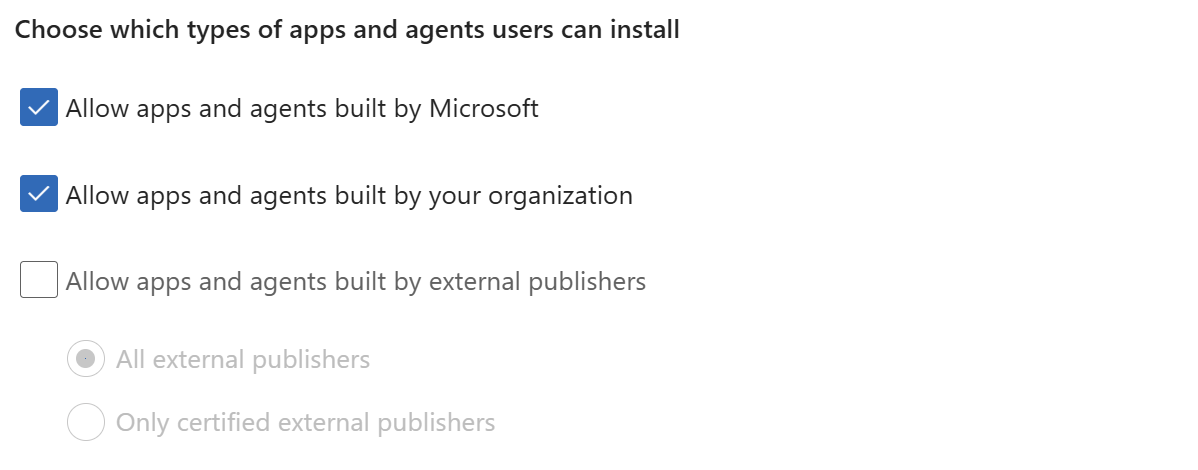
Unrelated Tip: you may be surprised to see that Allow apps and agents built by external publishers is enabled by default. As a best practice, consider unchecking this option so you can approve external agents on a case-by-case basis. There is additional risk in allowing external agents:
- Copilot agents can query and act on organizational data.
- External agents provide a new pathway for data movement, governed by their own privacy policies and security practices.
Be patient
It may take up to three hours for Frontier features to be visible to users.
References
- Get Started with Frontier for IT Admins (microsoft.com) – The Frontier program allows you to opt in to innovative and emerging AI features before general availability. Access varies depending on your role and subscription.
- Get started with the Microsoft Copilot Frontier Program (learn.microsoft.com) – The Microsoft Frontier program gives organizations early access to innovative and emerging AI capabilities in Microsoft 365 before those features reach general availability (GA). By opting in to Frontier, IT administrators can evaluate new Microsoft Copilot agents and AI-powered experiences, determine readiness for broader deployment across their tenant, and provide feedback about Frontier feature capabilities to Microsoft.

 You are free to share and adapt this content for any purpose as long as you give appropriate credit in a reasonable manner.
Leave a Reply