
Sysinternals Live is a Microsoft-owned website and WebDAV server that distributes the latest tools from Sysinternals. The server has a tools folder containing individual executables.
- As a web server, you can download tools through your browser.
- As a WebDAV server, you can mount its UNC path directly into Windows and run commands from your desktop or command line.
| Web server address | https://live.sysinternals.com/tools/ |
| WebDAV UNC path | \\live.sysinternals.com\tools |
How to browse the Sysinternals UNC
Copy or remember the following UNC (universal naming convention):
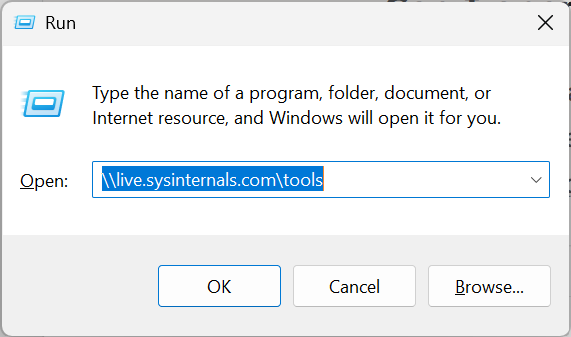
\\live.sysinternals.com\toolsFile Explorer – To open the UNC as a folder, paste the UNC into the Run menu:
- Open the Run menu (Win-R)
- Paste or type the UNC and hit enter
- Wait a moment for File Explorer to open
⚠️ It may take a moment for File Explorer to open and list the contents of the folder. During this time, File Explorer might show old content or might not be fully responsive. Especially when connecting for the first time, give Windows a moment.
CMD prompt – You can reference the UNC in most places that accept a path. It is not necessary to open the UNC on desktop before using the UNC at a command line.
rem List all files on the file share
dir \\live.sysinternals.com\tools

rem Execute a program
\\live.sysinternals.com\tools\procmon.exe

rem Execute a program with a parameter
\\live.sysinternals.com\tools\whois.exe humanextended.com

rem Copy a file to the current local directory
copy \\live.sysinternals.com\tools\procmon.exe .

rem Copy a file to the TEMP directory
copy \\live.sysinternals.com\tools\procmon.exe %TEMP%

rem Automatically mount and change into the directory
pushd \\live.sysinternals.com\tools
rem After executing commands, pop out:
popdPowerShell – You can reference the UNC in most places that accept a path:
# List all files on the file share
Get-Item \\live.sysinternals.com\tools\*

# Execute a program
& "\\live.sysinternals.com\tools\procmon.exe"

# Execute a program with a parameter
& "\\live.sysinternals.com\tools\whois.exe" "humanextended.com"

# Copy a file to the current folder
Copy-Item "\\live.sysinternals.com\tools\procmon.exe" .

# Copy a file to the TEMP folder
Copy-Item `
  "\\live.sysinternals.com\tools\procmon.exe" `
"$env:TEMP\procmon.exe"Troubleshooting
- Make sure you are specifying the \tools\ folder. Specifying just \\live.sysinternals.com without the folder will not work.
- If you are a Windows administrator, you might associate UNC paths with SMB servers. SMB servers allow you to connect to the root and enumerate shared folders. However, Sysinternals uses WebDAV, which can also be accessed with a UNC path on Windows. The Sysinternals WebDAV server does not support connecting to the root.
- If you attempt to connect to the root with a CMD command, you will get error 53 (“The network path was not found”)
- If File Explorer seems locked up, wait a minute or two. A delay is normal the first time you attempt to establish a connection.
- If it remains blocked, see if your firewall or administrator is blocking UNC paths or the Sysinternals server.
Frequently Asked Questions
How do I open the Windows Run menu?
There are a few ways to open the Run menu:
- Press Win-R (press the Windows key and R at the same time), or
- Right-click the Start menu with your mouse and select Run, or
- Open the Start menu and type “run” to find the command
💡 Tip: Press the down key a few times to see prior commands. You can use this history to find a recent command instead of retyping it.
What is the value of the Sysinternals Live server?
The website interface allows you to download individual tools without expanding a ZIP file first. The WebDAV server allows you to fetch or execute a tool from any Internet-connected computer. The live server provides an alternate distribution method that can be useful in some environments.
When should I not use the Sysinternals Live server?
The Sysinternals Live server is not suitable when:
- You do not have an Internet connection.
- You need a specific version of the tool (the live server always has the latest).
- Your administrator blocks WebDAV or access to the server.
In these cases, download the tools separately before needing them.
Can I open the Sysinternals Live server in my web browser?
Yes. You can download individual tools through a web browser:
- https://live.sysinternals.com or
- https://live.sysinternals.com/tools/ (identical contents)
In Chrome and Edge, you can paste the UNC into the browser address bar. The results will look similar to the website except all links will have file:// links instead of https:// links. The file will download normally by your browser. Note that some firewalls or administrators may block UNCs in browsers. If that happens, try using the https:// link instead.

 You are free to share and adapt this content for any purpose as long as you give appropriate credit in a reasonable manner.
Leave a Reply